


Self-Service Analytics for Every Team, Without New Power BI Licences
 João Sousa··6 min read

Power BI is built for analysts. The dashboards your BI team builds are excellent. The problem is getting those insights to the people who need to act on them. Sales teams, operations managers, finance controllers, HR business partners: they all need numbers, but most of them do not have, and do not need, a full Power BI licence.
The traditional answer has been to export to Excel, schedule email reports, or buy licences for a handful of "power users" who act as intermediaries. All three approaches have the same flaw: by the time the data reaches the person who needs it, something has changed.
PowerBI Portal solves this with a different model: a flat monthly subscription that gives any number of users access to the reports your BI team already built, through a branded web portal, without requiring a Power BI licence for each viewer.
The Licence Cost Problem
Microsoft Power BI Pro costs €12.10 per user per month (annual billing, ex-VAT). For a team of 50 people who need read-only access to two dashboards, that is €605 per month, or €7,260 per year, for a licence that includes features most of those users will never use.
Power BI Premium Per User (PPU) starts higher and adds capacity. For organisations that want broad data access without broad capability, neither option is well-suited.
| Scenario | Approach | Monthly Cost | Per user |
| 50 viewers, PBI Pro each | Microsoft Power BI Pro | €605/mo | €12.10/user/mo |
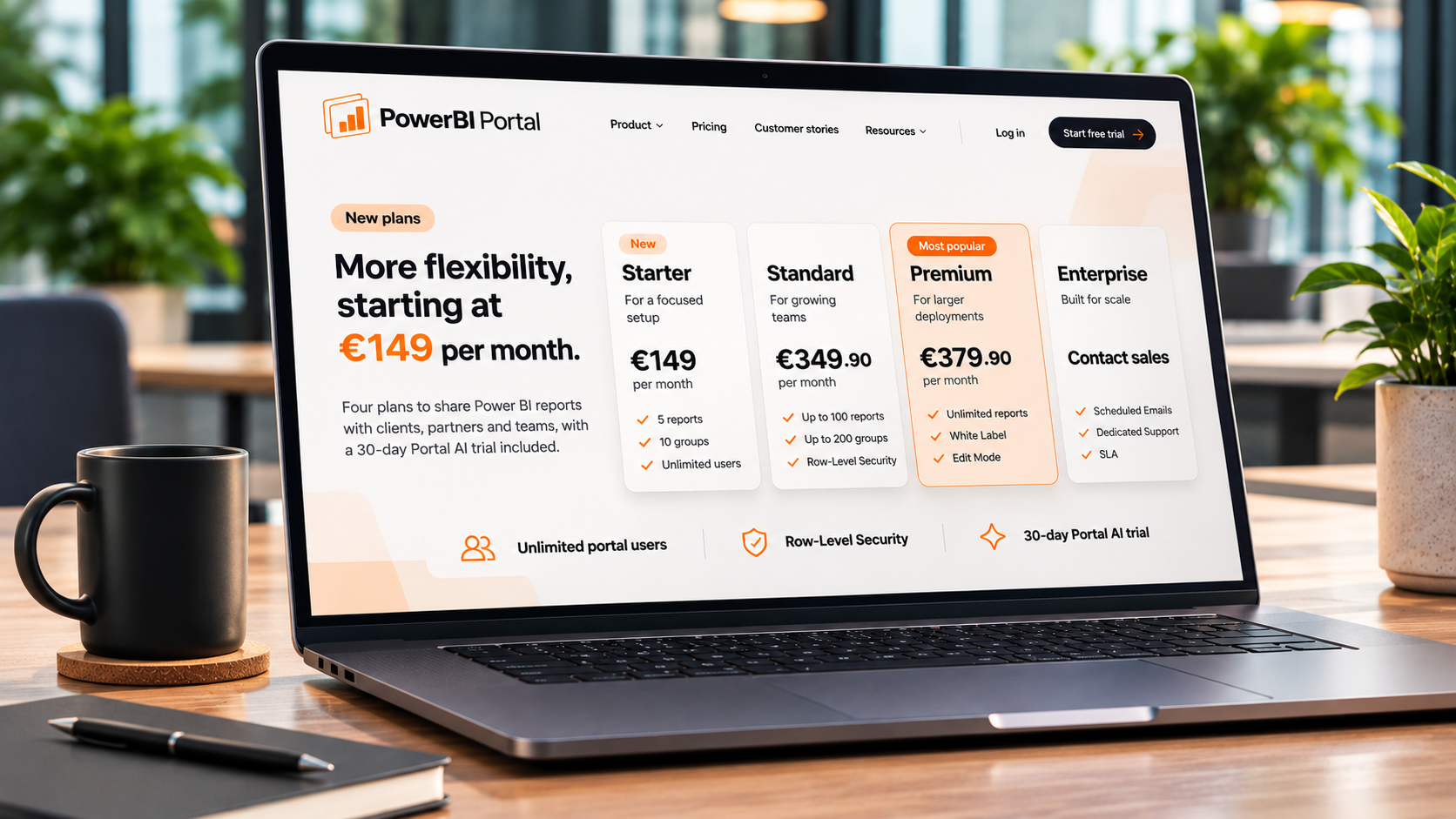
| 50 viewers, up to 5 reports | Portal Starter plan | €149/mo (billed monthly) | ~€3/user/mo |
| 200 viewers, up to 100 reports | Portal Standard plan | €349.90/mo (billed monthly) | ~€1.75/user/mo |
| Unlimited reports, any number of viewers | Portal Premium plan | €379.90/mo (billed monthly) | No per-user cost |
Portal plan only; Fabric/Embedded capacity not included. Try the cost simulator here.
PowerBI Portal automatically pauses your Embedded or Fabric capacity when no one is using the portal and resumes it when someone opens a report, so the capacity is not billed during off-hours.
The comparison above is illustrative, but the structural point holds: for view-only access to governed reports, a portal model is significantly cheaper than individual licences once your audience reaches more than 15–20 people.
| Important clarification: PowerBI Portal does not replace Power BI for report authors. Your BI team still builds reports in Power BI Desktop and publishes them to the Power BI service. Portal is the distribution layer: it makes those reports accessible to a wider audience without requiring everyone to have a Power BI account. |
What "Self-Service" Actually Means in a Portal Context
Self-service analytics means different things at different levels of an organisation. For most viewers, self-service means being able to find the right report, apply the right filters, and get an answer without asking the BI team. For more analytical users, it means asking follow-up questions and exploring data in ways the original report did not anticipate.
PowerBI Portal addresses both levels:
- Report access: viewers navigate a branded portal and open the reports they are authorised to see, filtered by the Row-Level Security set up on each report in PowerBI Portal
- Report interaction: standard Power BI interactions work inside the portal (slicers, drill-through, cross-filtering) without the user needing a Power BI account
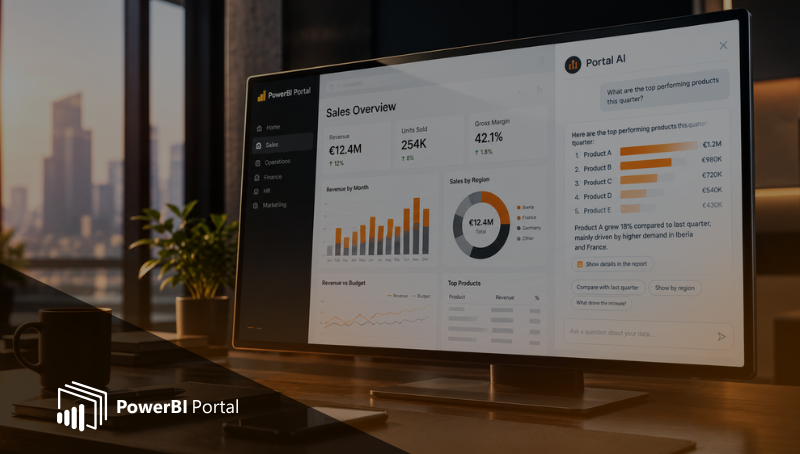
- Portal AI: users type natural-language questions and get answers drawn from the open report's data, filtered by the Row-Level Security set up on each report in PowerBI Portal
Portal AI: Natural Language for Every Team Member
Portal AI is the conversational layer built into every PowerBI Portal plan. It is not a separate product: a short one-time activation by your administrator, then you switch it on for each report you choose. It is included in your 30-day trial from day one.
What Portal AI makes possible for non-technical users:
- Ask questions in plain language: no DAX, no filters, no pivot tables
- Get instant answers drawn from live report data, not static exports
- Follow up with additional questions in the same session: "Now show me just the European region" or "Break that down by product category"
- Receive answers in their preferred language: Portal AI answers in the language the user writes in
After the trial, Portal AI usage is billed in AI credits, pay-as-you-go; the Enterprise plan includes an annual credit pack.
For C-level executives, the value proposition is direct: open the portal on a tablet before a board meeting, ask two questions, get the numbers you need. No intermediaries, no request queues, no waiting for the weekly report to arrive.
For C-level executives, the value proposition is direct: open the portal on a tablet before a board meeting, ask two questions, get the numbers you need. No intermediaries, no request queues, no waiting for the weekly report to arrive.
| Governance by design: Portal AI inherits the Row-Level Security already set up on your reports in PowerBI Portal. With RLS configured, every question is answered using only the data the user can already see: a salesperson asking "What is total company revenue?" will see only the revenue from the accounts in their territory. |
Which Plan Fits Which Organisation?
The four PowerBI Portal plans are sized for different deployment scenarios:
- Starter (€149/month billed monthly, or €133.25/month on an annual plan): ideal for small organisations starting with a few reports (up to 5 reports and dashboards), with unlimited viewers. Includes 100 Portal AI trial credits.
- Standard (€349.90/month billed monthly, or €316.58/month on an annual plan): designed for multi-team deployments with up to 100 published reports and a broader viewer base. Includes 150 Portal AI trial credits.
- Premium (€379.90/month billed monthly, or €358.25/month on an annual plan): unlimited reports and unlimited viewers, the right choice for organisations where data access needs to scale without a corresponding cost increase. Includes 200 Portal AI trial credits.
- Enterprise: for complex deployments with custom SLA, dedicated support, and an annual Portal AI credit pack negotiated as part of the contract.
From BI Investment to Business Impact
Most organisations have already made the investment in Power BI: the data models are built, the reports are published, the governance is in place. The data is ready. Distribution is the barrier.
Every team that cannot access the BI team's work without filing a request is a team making decisions on stale data or no data. PowerBI Portal removes that barrier: the reports your BI team built yesterday are in the hands of every stakeholder who needs them today, filtered to what each person is authorised to see, with an AI assistant on standby for the follow-up questions.
That is what self-service analytics looks like for the organisations that cannot (and should not) give everyone a Power BI licence.
| Give every team access to your data, without buying a licence for each person. PowerBI Portal starts at €149/month. 30-day free trial included. |
Share this post: