

What Is Portal AI? How to Ask Questions About Your Power BI Data in Plain Language
 João Sousa··5 min read
A Report Tells You What Happened. Portal AI Lets You Ask Why.
Most business intelligence tools give users reports. Portal AI gives them answers. The distinction matters more than it sounds.
When someone on your team wants to know which region grew the most last quarter, they have two options. They can open a report and spend time drilling through pages, filters, and tabs until they find the number. Or they can simply type the question.
That second option is what Portal AI makes possible.
What Portal AI Is
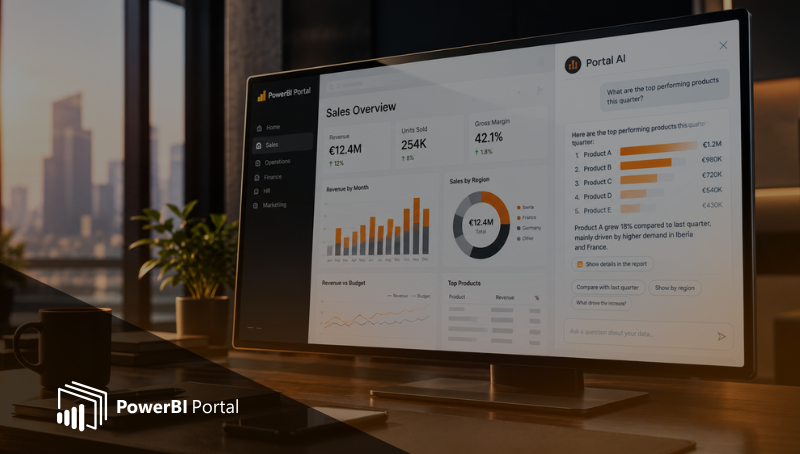
Portal AI is a feature built into PowerBI Portal that lets users ask questions about their data in plain language and receive direct answers, without navigating through report pages or adjusting filters manually.
The user types a question in a text field inside the portal. Portal AI reads it, works out what is being asked, and returns a response in the form most suited to the question: a table, a list, a value, or plain text.
No separate application to open, no login beyond the portal itself, and no training required on the user's side.
What You Can Ask
The range of questions Portal AI handles is broader than it might first appear. Here are the main categories:
| Category | Example Question |
| Comparisons | 'Which product line had the highest margin in Q2?' |
| Rankings | 'Who are the top 10 customers by revenue this year?' |
| Trends | 'How did sales in the North region evolve over the past six months?' |
| Variances | 'What is the difference between actual and budget for July?' |
| Drill-downs | 'Show me orders above €50,000 placed last week.' |
Questions can be direct or exploratory. Portal AI handles both.
The RLS Differentiator: Why This Is Not Just Another Chatbot
This is where Portal AI separates itself from a generic AI assistant.
Every response Portal AI gives is filtered by the permissions of the person asking. If a regional manager is only authorised to see data for their region, they will only get answers for that region, even if they ask a question about the whole company.
This is not a manual restriction that needs to be configured separately. Portal AI inherits the Row-Level Security already set up on your report in PowerBI Portal. There is no extra layer to manage. The rules that apply to the report apply to every question, automatically.
This is what makes Portal AI safe to roll out to external users. With RLS configured, a client accessing their portal can ask questions about their data and will never see data belonging to another client, regardless of how the question is phrased.
If you want to understand how Row-Level Security works in Power BI and how Portal AI enforces it, the article 'AI Answers Are Only Useful If They Respect Data Security' covers the underlying logic in detail.
Language Support
Portal AI supports questions in any language. Response quality may vary depending on the language, with the best results in English and other widely spoken languages.
For portals that serve clients or teams across multiple countries, this removes the need to build separate language-specific reports or maintain parallel content. Users can ask in the language they work in and get a direct response.
What Portal AI Is Not
A few things worth being clear about, to avoid a mismatch between what the product delivers and what teams expect.
- Not a general-purpose chatbot: Portal AI does not answer questions about topics outside your data. It does not browse the internet, summarise external documents, or know anything beyond what is in the datasets connected to your portal.
- Not a replacement for a BI analyst: Complex modelling, calculated measures, and data transformation still require the right expertise. What Portal AI handles is the flow of day-to-day data questions that currently takes up a large portion of an analyst's time.
- Distinct from Microsoft Copilot and Fabric IQ: Those tools (including the Fabric IQ skill launched in June 2026) are designed for users inside the Microsoft 365 environment with Fabric licences. Portal AI is built for portal-based access, including external users, with no additional licensing required per user.
Who It Is For
Portal AI is built for anyone who accesses data through a PowerBI Portal. That includes:
- Business users inside your organisation who want self-service answers without going through the analytics team
- External clients or partners who access a branded portal but do not have Power BI licences
- Managers who need quick answers on the go, without opening a desktop application
The experience is the same for all of them: type a question, get an answer.
What Changes When Portal AI Is in Place
The pattern most BI teams live with is a steady flow of requests: 'Can you filter this for last month?', 'Can you show this by product?', 'What was the number for the South region specifically?'
Portal AI absorbs most of those questions. Users get their answers directly. The analyst gets their time back for the work that actually requires their expertise.
The reports do not change. The data does not change. The permissions stay the same. What changes is that the people reading the data no longer need someone in the middle to answer their follow-up questions.
PowerBI Portal includes Portal AI as part of the product. To see if it fits your setup, start a free trial here.
Share this post: