





PowerBI Robots Just Got Smarter: New Interface, Onboarding, and AI Summaries
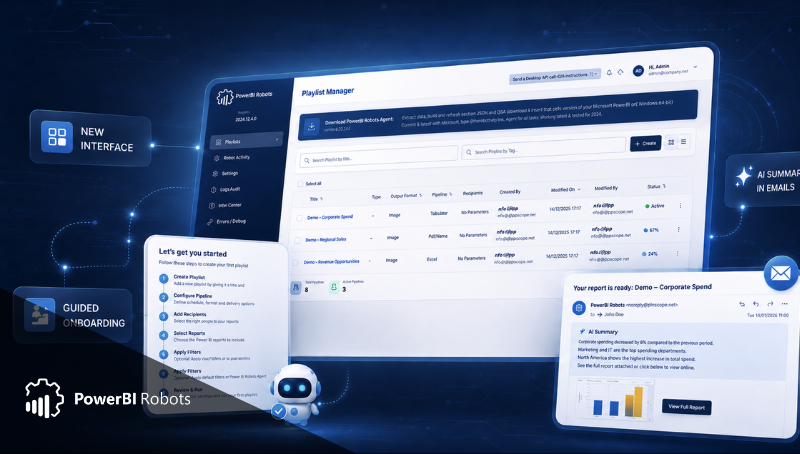
Table of Contents
PowerBI Robots has a new version and this release brings more than incremental changes.
The 2026 update introduces a redesigned interface, a new onboarding experience, and AI-generated summaries embedded in report emails. Together, these updates improve how teams configure, deliver, and consume Power BI reports.
If you already use PowerBI Robots, you'll find the same workflows you rely on today. If you're new to the platform, you'll find it easier to get started and reach your first working automation faster.
This article gives a high-level view of what has changed and what to expect from the new PowerBI Robots experience.
A cleaner interface that feels familiar
The most visible change in this PowerBI Robots redesign is the new interface.
The application now uses a cleaner layout, better spacing, and a more consistent structure across screens. It's easier to navigate between playlists, recipients, reports, and schedules without losing context.
What matters is not just how it looks, but how it works in daily use. Tasks like reviewing a playlist, checking a schedule, or confirming a delivery are now easier to scan and understand. You spend less time figuring out where things are and more time managing your reporting.
At the same time, the experience remains familiar. Existing workflows have not been removed or reimagined. You can still create playlists, configure recipients, add reports, apply filters, and monitor executions in the same way.
The difference is clarity.
For teams managing multiple reporting flows, this makes a noticeable impact. It reduces friction when reviewing configurations and helps avoid mistakes in recurring report deliveries.
Old Interface:

New Interface:

A guided onboarding to get started faster
One of the most important changes in this PowerBI Robots new version is the onboarding experience.
Instead of starting with a blank interface, new users are guided through a structured setup flow. The onboarding covers the key steps required to create a working automation:
- Creating a playlist
- Configuring the playlist
- Adding recipients
- Selecting reports
- Applying filters by recipient
- Installing and configuring the Agent
- Reviewing execution
This matters because getting started is often the biggest barrier. Many users understand what they want to automate, but not how to configure it inside the tool.
The new onboarding reduces that gap.
It focuses on the essentials and helps users complete their first end-to-end setup without jumping between screens or guessing what comes next. By the time the onboarding is complete, users have not only configured a playlist, they understand how the product works.
For teams running trials or onboarding new colleagues, this makes adoption easier and more predictable.
AI summaries that make report emails easier to read
The third major addition in this PowerBI Robots update 2026 is AI-generated summaries in report delivery emails.
Until now, report emails typically included a snapshot or attachment. Recipients had to open the report and interpret the visuals to understand what mattered.
With the new version, the email itself can include a short summary generated from the report content.
This changes how reports are consumed.
Instead of starting with a dashboard image, the recipient starts with context. They can quickly understand what the report contains and decide whether they need to explore it further.
This is especially useful in common scenarios:
- Weekly reports that need a quick overview
- Operational reports where time matters
- Customer-facing emails where clarity is important
- Mobile reading, where opening images is less convenient
The summary does not replace the report. It complements it. It helps the recipient focus faster and reduces the effort required to interpret the data.
For teams sending frequent reports, this improves the experience without requiring changes to the reports themselves.
What happens when you upgrade
For existing users, the transition to the new version is straightforward.
When you open PowerBI Robots after the update, you'll see the redesigned interface immediately. Your playlists, reports, recipients, and schedules remain in place.
The structure is the same, but the layout is clearer.
A good starting point is to open one of your existing playlists and review it in the new interface. Check recipients, reports, filters, and schedules. This helps you get familiar with the new layout while confirming that your automation is still configured as expected.
If you are onboarding new users, the guided setup will help them reach their first successful execution faster than before.
Behind the interface, the application has also been updated at a technical level. These changes support modern development standards and align with current security expectations. As part of that effort, DevScope's ISO 27001 certification reflects a continued focus on security across the platform.
This update combines visible improvements with a stronger technical foundation.
Why this update matters
This PowerBI Robots update is not about adding isolated features. It is about improving the full experience of report automation.
- The new interface reduces friction in daily use
- The onboarding helps users get started with more confidence
- AI summaries improve how reports are consumed
Together, these changes make PowerBI Robots easier to adopt, easier to use, and more relevant for teams that rely on automated reporting.
If you already use the product, you'll find it cleaner and easier to manage. If you're evaluating report automation, this version makes it easier to understand how everything fits together.
Explore each feature in detail
This article provides an overview of the release. Each feature is covered in more detail in the following articles:
- A New Look for PowerBI Robots: What Changed in the UI and Why
- Set Up PowerBI Robots in Under 10 Minutes: The New Onboarding Walkthrough
- AI Summaries in Power BI Report Emails: What They Are and How to Use Them
Start a PowerBI Robots trial and explore the new version yourself.

Share this post:





