A Governed AI Agent for Power BI: Turning Questions into Trusted Answers
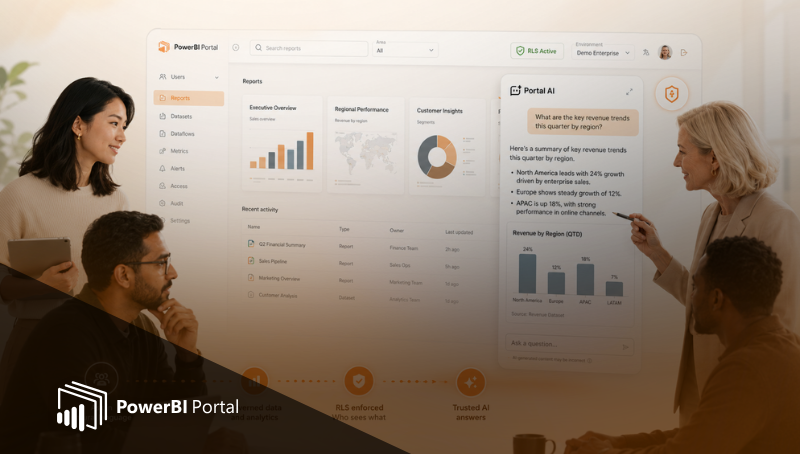
As analytics platforms mature, expectations change. Dashboards alone are no longer enough. Business users expect to ask questions, explore scenarios, and receive explanations in natural language, without needing to understand data models, filters, or visuals.
This is where AI enters the picture. But in client-facing analytics, AI cannot simply be "smart."
It must be governed, secure, and predictable.
The AI agent built on top of PowerBI Portal was designed with this exact reality in mind. It is not a generic chatbot layered on top of dashboards. It is a governed analytics agent, deeply integrated with Power BI's data model and security rules, built to answer questions without ever stepping outside the boundaries defined by your organization.
This article explains what makes the PowerBI Portal AI agent fundamentally different, why governance is non‑negotiable in real-world scenarios, and how natural‑language analytics can finally be trusted in client environments.
The Problem with Traditional BI Experiences
Power BI dashboards are powerful, but they require users to:
- Understand report structure
- Know where information lives
- Interpret visuals correctly
- Navigate between pages and filters
For analysts, this is acceptable. For clients, executives, and non-technical users, it often isn't.
Many questions never get asked because:
- The right report is hard to find
- The answer requires multiple steps
- Users are unsure whether they are looking at the right data
AI promises to remove this friction by allowing users to ask directly:
"What happened?"
"Why did this change?"
"How does this compare?"
But the way AI is introduced into analytics matters more than the AI itself.
Why "Just Adding a Chatbot" Fails
Many BI chat experiences fail because they treat AI as a layer on top of analytics, rather than inside the analytics model.
Common problems include:
- AI answering using data the user shouldn't see
- Inconsistent answers compared to dashboards
- Follow‑up questions expanding scope incorrectly
- Users losing trust after one incorrect response
These failures don't happen because the AI is poorly trained. They happen because governance was not part of the design.
In client-facing analytics, governance is not optional.
What the PowerBI Portal AI Agent Actually Is
The PowerBI Portal AI agent is a natural‑language analytics interface that operates directly on top of Power BI datasets, within the exact same security and semantic rules used by reports.
This means:
- The AI does not bypass Power BI
- The AI does not see "all data"
- The AI does not invent a parallel security model
Instead, every question is answered inside the Power BI security context of the user.
If a user cannot see certain data in a report, the AI agent cannot see or reference it either.
AI That Respects Row‑Level Security by Design
Row‑Level Security (RLS) is the backbone of real analytics governance. It defines what each user is allowed to see based on roles, attributes, or organizational rules.
In PowerBI Portal, the AI agent:
- Executes queries within the active RLS context
- Applies the same filters used by dashboards
- Inherits role definitions automatically
- Preserves security across follow‑up questions
This is a critical distinction. The AI does not "filter answers after the fact." It never operates outside the user's allowed data slice.
Why This Matters in Client Scenarios
Client analytics environments are fundamentally different from internal BI:
- Multiple organizations
- Multiple roles
- Contractual data boundaries
- Zero tolerance for data leaks
In this context, an AI agent must meet a higher bar:
- Correct answers are not enough
- Answers must be authorized
- Behavior must be consistent and predictable
The PowerBI Portal AI agent was built explicitly for these conditions.
Answers, Not Dashboards (But Powered by Them)
The AI agent does not replace dashboards. It complements them.
Dashboards remain:
- The authoritative definition of metrics
- The visual validation layer
- The source of truth for structure and semantics
The AI agent acts as:
- A shortcut to insight
- A conversational entry point
- A guided exploration tool
Users can move seamlessly between:
- Asking a question
- Viewing the underlying report
- Drilling further using natural language
This keeps analytics explainable and grounded.
Handling Follow‑Up Questions Without Breaking Governance
One of the hardest problems in conversational analytics is handling follow‑up questions safely.
For example:
- "What are my sales this month?"
- "Why did it drop?"
- "Is this happening everywhere?"
In many AI systems, context expands too aggressively, and security boundaries start to blur.
The PowerBI Portal AI agent preserves context and constraints:
- Follow‑ups stay within the same data scope
- Security rules never loosen
- Comparisons respect the same permissions
The conversation feels natural to the user, but disciplined under the hood.
Multilingual Analytics Without Complexity
Client environments are often multilingual by nature. Expecting separate dashboards or models per language increases cost and complexity.
The AI agent supports natural-language questions across multiple languages while:
- Querying the same dataset
- Using the same measures
- Applying the same security rules
This allows organizations to serve international audiences without duplicating analytics logic.
Reduced Dependency on Analysts and Support Teams
In many organizations, analytics questions flow through a bottleneck:
- Clients ask questions
- Consultants or analysts pull answers
- The same explanations are repeated
The AI agent shifts this dynamic:
- Users ask directly
- Answers are immediate
- Analysts focus on higher‑value work
Because answers are governed, this self‑service does not introduce risk.
Trust Is the Feature That Matters Most
Clients don't evaluate AI agents by how clever they sound.
They evaluate them by one simple criterion:
Can I trust this answer?
Trust is built when:
- AI answers match dashboards
- Security boundaries are respected
- There are no surprises
- Explanations remain consistent over time
A governed AI agent earns that trust. An ungoverned one loses it quickly.
AI as Part of the Product, Not a Gimmick
In PowerBI Portal, the AI agent is not a demo feature. It is part of the product experience:
- Governed
- Secure
- Integrated
- Scalable
It aligns with the same principles that make the portal effective:
- Separation of creation and consumption
- Centralized governance
- Predictable behavior
- Client‑ready delivery
Final Perspective
AI in analytics is inevitable. What is optional is whether it is done responsibly.
The PowerBI Portal AI agent proves that natural‑language analytics and strong governance are not opposites. When AI is built inside the analytics model, respecting security, semantics, and context, it becomes a powerful, trusted interface for real users.
Not just internally. Not just in demos.
But in real client scenarios, where trust matters most.
👉 Book a demo today to see how PowerBI Portal helps you get the most out of Power BI capacities.

Share this post: